


Summary
Here are five simple tips on how to improve wellbeing and communication by changing how you start and end each day and week positively. Shared by Robin Davis on Twitter.
Content
1. At the start of a shift, day or week make sure you check in with everyone. This is a good chance for everyone to understand what’s happening, to raise concerns and to check everyone is ok. Check out the great 'Start Well End Well' work from North Bristol NHS Trust.
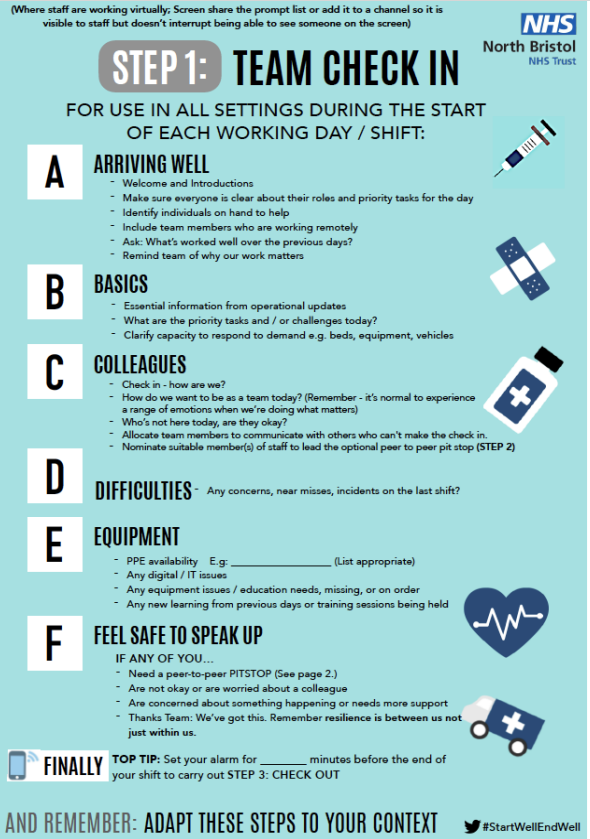
2. For virtual teams try a quick online catch up at the start of the week to ensure everyone is up to speed on the weeks' work and issues or challenges. Make sure you ask if people are ok? It's worth Asking Twice: “ Are we sure we are all ok?”

3. Start your own day well. Make the first email you send a positive one. Pick a colleague and let them know what you enjoy about working with them or thank them for a great piece of work.
4. Don’t finish on a down note. Check out the going home checklist, reflect on what’s gone well. Think about what has been achieved (not just what is left to be done).

5. A great way to finish the week is with #High5Friday a chance to reflect on the week and share on Twitter. Some teams use an MS Team channel to reflect on the highlights of the week. A great way of virtual teams keeping in touch and sharing achievements.


Recommended Comments
Create an account or sign in to comment